Moving assets
Moved off an exchange: keep the old Binance account or close it?
The coins are moved and the old account is still open. Closing it takes a few clicks, but afterwards you can't log in or see your history, so a few things need checking first.
Say the move is done. The coins landed at the new address, the amounts match, and the old exchange account is still sitting there with a few cents of USDT in it. Closing it takes a handful of clicks. Leaving it open seems harmless.
Either choice can be right. What decides it is three things: whether the old platform still serves you, whether your records are downloaded, and whether anything is still attached to the account. If you simply stopped using the platform, an emptied account costs you very little to keep. If the platform is leaving your country and you are not coming back, work through the list below and then close it. The one mistake here that cannot be undone is the reverse order: close first, then remember a transaction you needed.
What happens if you leave an old exchange account open
Something does. Section 19 of Binance's Terms of Use (marked last updated 31 August 2023, checked October 2026) covers closure and dormancy. In short:
- if you have not accessed the account for 90 consecutive days, Binance sends a notice that it will be treated as dormant;
- if you do not respond within 30 days of that notice, Binance may mark it dormant, convert the assets in it into other assets, charge a monthly dormant-account fee, or close it;
- a dormant account that has been closed cannot be reactivated.
The wording is "may", not "will", and the terms give no fee amount, so neither does this page. The direction is clear enough, though: an account holding small leftovers that nobody logs into ends up being handled on someone else's schedule. If you keep it, keep it empty and sign in every few months.
The other cost is security. The old password, the phone number and email on file, any API keys you never deleted: each one is still a door someone can try. If the account stays open, at least:
- delete API keys you no longer use, starting with any that had trading or withdrawal permission;
- remove whitelist addresses you will not send to again;
- if your phone number or email changed, update the account to one that can actually receive codes, or the first step of any future login will fail.
Where those settings live is covered in Exchange Security: 2FA, Whitelist, Anti-Phishing. It is written for a new account; for an old one, read it backwards.
The four warnings on Binance's close-account page
Before closing, read the official page. Binance's help article is now titled "How to Close My Binance Account?" (the URL still says delete). The English version shows an update date of 2026-09-03 and opens with four warnings in red:
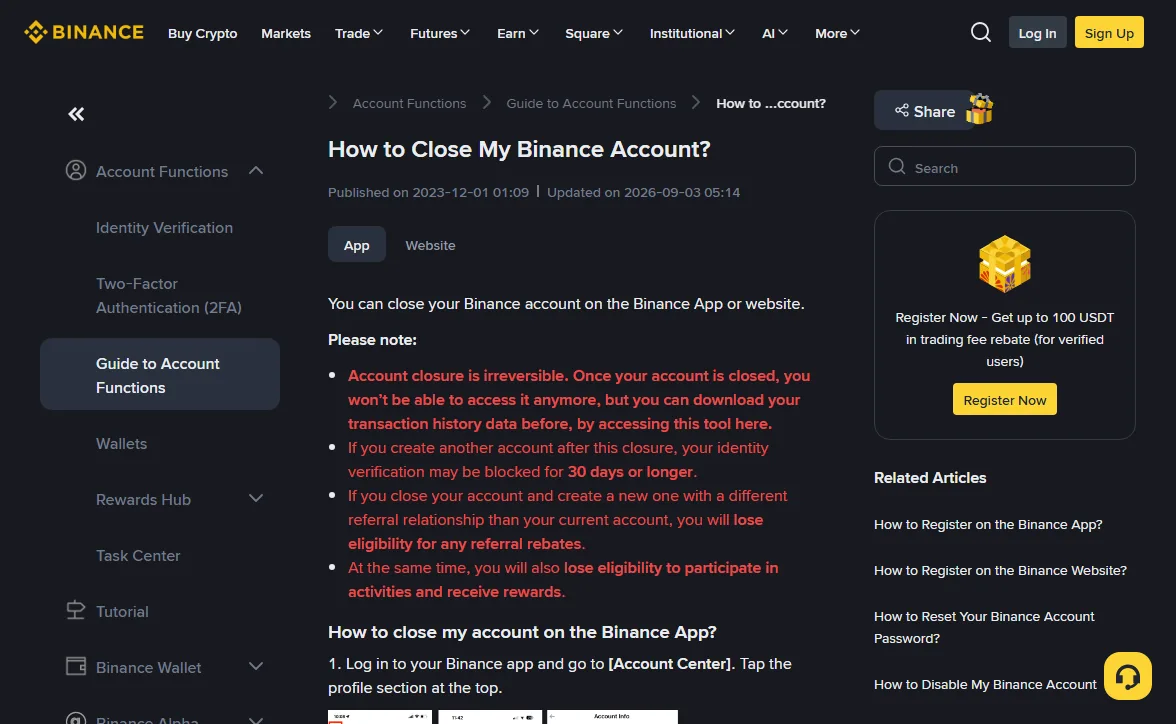
- It is permanent. You lose access to the account, but the same sentence links to a tool for downloading your transaction history first. That is the most useful line on the page;
- if you open another account afterwards, identity verification may be blocked for 30 days or longer;
- a new account with a different referral relationship loses eligibility for the old referral rebates;
- you also lose eligibility for activities and rewards.
The second point matters most if the old and new platforms are the same company, for example moving to a regional entity or starting a clean account. Close first and you may spend a month or more unable to verify, with your coins needing somewhere to sit. Same platform? Finish verifying the new account, then close the old one.
The page ends by noting that Binance keeps some personal data after closure for as long as anti-money-laundering and counter-terrorist-financing laws require, and removes it only after that period. Closing the account is not the same as erasing your data.
What has to be cleared before "Close Account" works
This is where the English page goes further than the others. The Chinese and Spanish versions, both last updated 2026-08-14, only say to move remaining assets elsewhere or lose them. The English one lists what will stop the closure:
-
More than 5 USD in the account
The page says that above 5 USD you need to withdraw. Amounts under that are often below the minimum withdrawal too; the options for those are in Leftovers below the minimum withdrawal.
-
Earn, Loans, Margin, Futures
Cancel Earn subscriptions and take the funds out, close open Loan orders, clear any Margin liability, and move Futures assets back to Spot or Funding. These are the same positions a delisting forces you to deal with early, and their cut-offs are in what happens to Earn, margin and futures positions.
-
A P2P order in the last 48 hours
You have to wait for it to complete. If you have just released coins and the buyer has not confirmed, leave the account alone: a dispute needs an account to be filed from.
-
Active sub-accounts
Close them first. Sub-account balances are easy to forget, since the main overview can read zero while a sub-account still holds something.
-
An active Web3 wallet
The page says to convert it to a private key. After that, the wallet is controlled by the key you hold, not by the exchange account, and keeping that key safe is the same job as any self-custody wallet.
With those cleared, the website path is: profile icon → Account → Security → Account Management → Close, then pick a reason, read the terms, Accept & Continue, tick the confirmation, Close Account and pass security verification.
The app takes a different route: Account Center → the profile section at the top → Security → Manage Account → Close Account.
Which records to download before closing
That download tool is your last chance at a complete history. At minimum, export:
- deposits and withdrawals, with the transaction hashes;
- trade history;
- internal transfers.
Note the hashes of the withdrawals you made for this move separately; they are the only proof that those coins left this account for that address.
Which fields to keep and how to store the files is in Which transfer records are worth keeping. One addition: open each export and check the row count and date range before you press Close. An empty file, or one that stops three months back, is fixable only while the account still exists.
Can't log in, or the account is restricted?
When the reason for moving is a regional exit, the old account is often in a withdraw-only state, or asks for extra documents before it lets you do anything. At that point closure is the wrong question. The coins come first, and an account that still holds them cannot pass the first check anyway.
The help article does not say whether a restricted account can be closed, and this page will not guess. What you can do: use Account restricted: can you still withdraw? to work out which kind of restriction you are under, withdraw what you can, then ask support about closure and keep a copy of that conversation.
Ignore anyone who contacts you offering to "close your old account for you" or "deal with an account that won't close" and asks for login details or a verification code. The close button lives on your own Security page after you sign in. No third party is needed for it.
Keep or close: find your row
| Where you are | The old account | Still to do first |
|---|---|---|
| The platform still serves your country; you just stopped using it | Fine to keep | Empty it, delete API keys and old whitelist addresses, sign in every few months |
| The platform has left or is leaving your country for good | Fine to close | Exports downloaded and opened, the five items above cleared |
| Old and new account are the same platform | Keep for now | Get the new account verified, then close, so the 30-day block cannot strand you |
| A withdrawal hasn't arrived, or a P2P dispute is open | Don't close | Settle it first; the account is where you'd file a claim |
If the next stop is still undecided, Your own wallet, or another exchange? helps settle that first. What happens to the old account can wait until the very end of the move.
Risk notice: closing an exchange account cannot be reversed, and assets left inside are lost. This page reflects Binance's help center and Terms of Use as opened in October 2026; the closure conditions and dormancy rules can change at any time, and other exchanges have their own rules in their own help centers. Crypto prices swing hard and you can lose all of the money you put in.