Accounts and fees
How Binance fees work, and what stacks
Fees get explained in a way that makes them sound complicated. Split into three independent questions they are not: are you making or taking, is the BNB discount on, and did you sign up with a code. Three separate dials.

The one-line version: trading fees, the BNB discount and the referral reduction are three independent dials that all work at the same time. Withdrawal fees are an entirely separate matter with no relationship to any of them: they are set by the chain you pick.
Fees get explained in a way that makes them sound harder than they are. The reason is that most write-ups fold trading fees, withdrawal fees, funding rates and fiat channel costs into one discussion, and you finish with an impression that money is leaking from everywhere and the sums do not close. Separated out, each one is simple.
This covers spot trading fees and withdrawal fees only: the two you actually meet while migrating or buying. The figures were checked in August 2026, but rates change, so the exchange's current fee page is the authority and this piece says where to find it.
Dial one: are you making or taking
The base layer, unrelated to codes or token balances.
Maker
- You post a price that will not fill immediately and it rests on the book
- You supplied depth, so the rate is usually lower or the same
- The cost is that it may not fill, or not when you wanted
Taker
- You cross the spread and fill against what is already there
- You consumed depth, so the rate is equal or higher
- What you buy is certainty — now, not later
At the ordinary user tier, maker and taker are currently the same figure, sitting in the 0.1% band (checked 2026-08). That means for most people there is no fee difference between making and taking, which surprises anyone arriving from equities. The gap only opens up once volume and token balance push you into the VIP tiers, where maker rates drop below taker rates.
How the VIP tiers are set
Two conditions decide the level: thirty-day trading volume and BNB balance. Every row states whether those are joined by "and" or "or", and that word matters, "or" means either qualifies, "and" means both must. The lower rungs tend to be forgiving; higher ones require both simultaneously.
For anyone in a migration, the tier system is safely ignorable. The volume threshold for the first VIP rung is in the seven-figure dollar range over thirty days (checked 2026-08). If your pattern is buying a few times a year and occasionally changing platforms, you will never approach it. Time spent studying the tier table would be better spent confirming your withdrawal network, which moves far more money.
One more thing: thirty-day volume is a rolling window, not a calendar month. People who traded heavily for a while and reached a tier will drop back out of it once activity falls off, and the rate follows. Neither the tier nor the rate is something you win permanently.
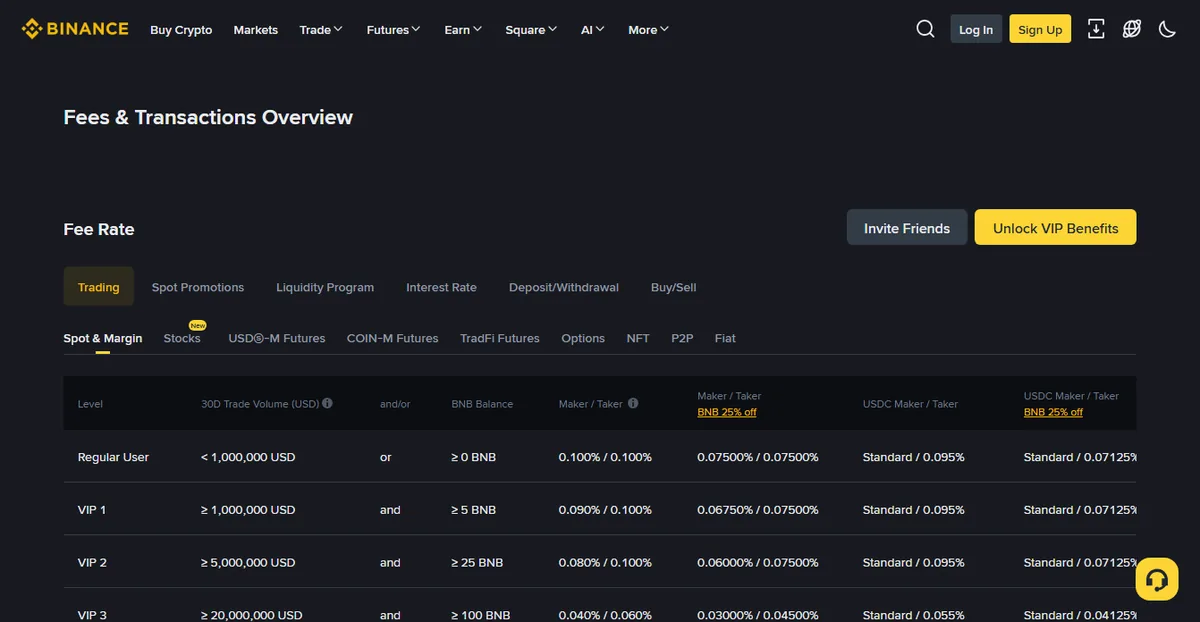
That page is worth clicking through yourself: besides the trading tab, the fee overview page has tabs for deposits and withdrawals, buy and sell, and others. Plenty of people read only the first one and assume that is everything.
Two traps are worth knowing before you read that table. The tabs are not denominated the same way: the trading tab is a percentage, the withdrawal tab is a flat amount per coin per chain, and putting the two side by side gives a number that means nothing. And the table gives the tier rules, not your rate — which tier you currently sit in, and whether the BNB discount is actually firing, live on your own fee settings page. This bites hardest during a migration, when people estimate their costs from a fee screenshot in some article that is neither current nor theirs.
Dial two: whether the BNB discount is on
Hold BNB and switch on "use BNB to pay fees" in settings, and fees are deducted from the BNB balance at a discount. The size of the discount is stated on the same fee table: it was a 25% reduction when we checked in 2026-08, and the platform can change it at any time, so treat the figure on the live fee page as the one that applies.
Whether to turn it on depends on how often you trade:
- Frequent traders: worth it. The savings accumulate meaningfully and the only cost is keeping some BNB around.
- A few trades a year: optional. Holding a volatile asset for the sake of the discount adds a price exposure you did not previously have.
Mine is switched on, but I keep only a few months of expected fees in BNB rather than stockpiling it. Saving on fees and taking a position are different decisions and I would rather not merge them into one.
An easily missed detail: when the BNB balance runs out, the system quietly falls back to the standard rate rather than blocking the trade. So if you depend on the discount, keep an eye on the balance: otherwise you can spend several months paying full price without noticing.
Dial three: the referral reduction
An account created with a referral code carries a fee reduction. This dial is independent of the other two — you can be a maker, with the BNB discount on, and holding a referral reduction, all at once.
Three things about it deserve to be stated plainly:
- The percentage is not fixed. Exchanges adjust it by campaign and by tier, so any write-up quoting a hard number should be discounted. Our referral block says "up to 20%", a figure we could not find on any official Binance page (see the disclosure); what you actually receive is whatever the exchange page shows.
- It only applies at account creation. An existing account cannot have a code added, as covered in the account-opening piece.
- Using a code does not raise your costs. It changes the reduction, not the underlying rate.

Our referral code BN6321
Go to the Binance sign-up page
That is a referral link and we may earn a commission from it. Signing up with our code gets you up to 20% off trading fees*; * the actual figure is whatever the exchange page shows and it can change. HUIVORA is run by an independent team and is not affiliated with Binance.
What the three look like stacked
A purely illustrative arithmetic, to convey the shape: call the standard rate X. The BNB discount takes it to 0.75X, the referral reduction takes a further share off that, so you land somewhat below 0.75X. Binance’s pages do not state that percentage, so we give no lower bound. The example describes the relationship, not a promised number: every layer's real value is whatever your own account displays.
A more useful framing: if you trade a handful of times a year, all three dials together save less than a takeaway meal. If you trade weekly, it is a real annual figure. Work out which of those you are before deciding how much attention this deserves.
Checking what you actually paid
The fee table states the rule; the trade history states the fact. Where they disagree, the history wins.
Open your trade history (some interfaces call it order history) and find the fill. Expanding it shows four things: execution price, quantity, fee amount, and which asset the fee was taken in. That last one gets overlooked, if it shows BNB, the discount applied; if it shows the asset you bought or the quote currency, it did not.
Three common versions of "that does not match":
| What you see | Usually because | How to confirm |
|---|---|---|
| Higher than expected, fee not in BNB | BNB balance ran out, so it fell back to standard | Check the balance and the toggle state at that time |
| Higher than expected, fee in BNB | It was a taker fill and you calculated as maker | The history marks maker or taker per fill |
| One pair unusually cheap or free | That pair has a promotional rate running | Look at the spot promotions tab on the fee page |
What genuinely saves money, and what is fiddling
Put the dials together and the list of actions that actually move the needle is short. In order of return:
-
Pick the right chain to withdraw on
Can save a double-digit dollar amount in a single transfer. The highest-return action available, and it costs you thirty seconds.
-
Enable the BNB discount, if you trade often
It keeps applying for as long as it is switched on, with nothing to keep managing. The cost is holding some BNB. Note the size of the reduction is set by the platform and can be revised at any time — whatever the Binance fee page currently shows is what applies.
-
Use a referral code at sign-up
A single action that keeps applying afterwards. There is no way to add it later, which is why it is worth thirty seconds at the moment of opening the account.
-
Make rather than take, where you can
No difference at the ordinary tier; it starts to matter once your volume does. Doing it now is about building the habit.
Comparatively not worth it: trading deliberately to climb the VIP ladder (the fees you generate exceed what you save), stockpiling BNB for the discount (converting a saving into a price exposure), and shuttling between platforms to chase rates (every move costs a withdrawal fee and real time).
My view is that fees are worth ten minutes of understanding and not ten hours of optimising. For most people a single wrong-chain withdrawal costs more than a full year of trading fee savings.
Withdrawal fees: a different thing entirely
This is where the confusion concentrates. Withdrawal fees ignore your VIP tier, ignore the BNB discount, and ignore the referral code. They are made of two parts:
- The network fee: paid to miners or validators, nothing to do with the exchange;
- Whatever the platform adds, policies differ.
So the same coin over different chains can differ by one to two orders of magnitude. A congested Ethereum mainnet transfer runs to double-digit dollars; high-throughput chains are often fractions of one. The figure changes daily and the only accurate one is what the withdrawal page shows before you press confirm.
The other thing to internalise: the fee comes out of the amount you typed, not on top of it. Enter 100, receive 100 minus the fee. When the amount is close to the receiving platform's minimum deposit, that subtraction can drop you under the threshold.
How to choose from the chains both ends support is in which chain to withdraw on, which also covers whether anything can be salvaged after a mistake.
What actually eats your money is usually not the fee
Pull back for a moment: list every cost over a year and trading fees are rarely the largest line. These three usually are.
The spread
Fill at market and your execution price differs from the mid. On liquid majors that gap is negligible; on thin pairs it can be several times the fee. It never appears on a statement, which is why almost nobody counts it as a cost.
The way to reduce it is limit orders: post a price you would accept and wait. The cost is that it may not fill. That is a trade-off rather than a trick.
Slippage
Order large enough to eat through several levels of the book and the back half fills at worse prices. Larger size and thinner pairs both make it worse. The check is simple: before ordering, look at whether the top couple of levels can absorb your size.
Trading more than you needed to
The most expensive item on the list, and entirely self-inflicted. Every round trip pays a fee and a spread; twenty unnecessary trades in a year is twenty of each. The most effective way to reduce fees has always been fewer trades, not moving the rate from 0.1% to 0.075%.
How this connects to migrating: if you sell and rebuy during a move, all three of the above happen twice. That is why sending the coin as-is usually beats converting and converting back — the difference is not in the fee line, it is in the parts that never appear on a statement. The comparison is in sell and rebuy, or just move the coin.
A few less common costs
| Item | When you meet it | Rough scale |
|---|---|---|
| Fiat channel fee | Buying with a card or third-party payment | Usually well above spot trading fees; the more convenient the route, the dearer |
| Peer-to-peer | Buying and selling with other users | The platform usually adds nothing; the cost shows up in the price you accept |
| Perpetual funding rate | Holding a perpetual position across settlement | Can be positive or negative; paid between longs and shorts, not to the platform |
| Margin borrowing interest | Using margin and actually borrowing | Accrues hourly or daily; adds up noticeably over a long hold |
The scales and directions above are deliberate; the specific values live on separate fee pages and change more often than spot rates. Whatever your screen shows when you act is what applies.
A word on leverage and derivatives: funding rates and borrowing interest look like rounding errors, but they accrue continuously, and they stack on top of a price risk you are already carrying. A leveraged position can be liquidated in a violent move, and the loss can be the entire margin. This piece explains costs; it is not an encouragement to use these products.
Where to check for yourself
Rather than remembering any number from any article, remember where the numbers live:
-
Trading fees: the fee overview page
Look for the trading fee overview. It splits by spot, futures and fiat, and shows both the standard and the discounted rate side by side.
-
Withdrawal fees: the withdrawal page itself
Select coin and network and the page states this transfer's fee and the minimum. That is the only live number.
-
Your own tier: the account page
VIP level, current rate and whether the BNB discount is active are all on your fee settings page. Do not infer yours from someone else's screenshot.
Do not switch platforms to chase a rate
Every move costs a withdrawal fee, the time to open and verify a new account, redoing every security setting, and one more opportunity to make a mistake in transit. Together those comfortably exceed whatever the rate difference saves.
Good reasons to move: the platform no longer serves your region properly, withdrawals have had real problems, or it does not support the coins and chains you need. "The other one is 0.02% cheaper" is not on that list.
If you are mid-migration, fees are a small part of the decision: land the assets safely first, optimise basis points afterwards. The order is in the migration handbook.
Do the referral reduction and the BNB discount work together?
Yes. They are independent dials and do not conflict, and whether you are a maker or a taker does not affect either of them.
Do withdrawal fees get cheaper at higher VIP tiers?
Usually not. Withdrawal fees are driven mainly by network costs and sit outside the trading fee tier system. Reducing them is a matter of choosing the chain.
Why does what I paid differ from the fee table?
Three common reasons: the BNB balance ran out so the discount did not apply, the fill was a taker fill and you calculated as a maker, or that pair has a promotional rate. Your trade history shows what was actually deducted, per fill.
Is the number on the withdrawal page final?
Yes. Before you confirm, the withdrawal page states the fee and the amount that will actually arrive, and that is what gets deducted. Remember it comes out of the amount you entered, so entering 100 delivers less than 100.
Can trading fees be refunded afterwards?
Fees on completed trades are not refunded. Referral-style reductions are applied at the time of charging or settled on a cycle, per whatever the platform's current rules say; they do not apply retroactively to past fills.
Our referral code
Sign up with our code for up to 20% off trading fees*
* The actual figure is whatever the exchange page shows and it can change. HUIVORA is run by an independent team and is not affiliated with Binance.