Accounts and fees
Exchange Security: 2FA, Whitelist, Anti-Phishing
The days right after your coins land somewhere new are the weakest point: you are changing bindings and reading verification codes constantly, which is exactly when phishing works. These four take under twenty minutes.
The days right after your coins land somewhere new are the account's weakest point. You are changing bindings, reading verification codes constantly, and logging in from several devices, which is exactly the state phishing is designed to exploit, because another verification email stops registering as unusual.
The four below take under twenty minutes together, and once done you can stop thinking about this for a long time. The order matters; work down it.
One: two-factor, with an app rather than SMS
Most people have two-factor switched on, and most have it switched on via SMS. That route has one weakness it cannot escape: SIM cards can be reissued. Someone walks into a shop with forged paperwork, your number moves to their hand, and every SMS-based entrance you own falls with it. This is not theoretical; it happens every year.
So the priority order is:
- An authenticator app: Google Authenticator, Authy, the one built into a password manager. Codes are generated on your device and never cross a network;
- A hardware security key — a step stronger where the platform supports it;
- SMS: fine as a backup, not as the primary.
Write down the recovery key
When you enable an authenticator, the page shows a long string, or a QR code. That string is the only thing that moves the authenticator to a new device. Lose the phone, reinstall the system, wipe the app data, without it you are into a manual appeal process of indeterminate length.
What I do is unglamorous: write it on paper and keep it with the passport. A cloud note works too, but that hands its security over to another account. Paper defends against forgetting, not against attackers — two different problems that deserve separate answers.
Two: an anti-phishing code, five minutes well spent
Plenty of people do not know this setting exists, and it has the best return of the four.
You choose a string in the security settings. From then on, every genuine email the exchange sends carries that string in a prominent place. An email arriving without it goes in the bin, whatever it looks like.
Why it works: a phishing email can copy the layout, the logo, the button styling, and can get the sending domain close enough to pass a glance. The one thing it cannot forge is a string only you and the platform know.
Two notes when setting it. Do not use a birthday, and do not use your username or handle: things others can guess or look up. A couple of unrelated words plus some digits is ideal. You do not need to memorise it; you only need to recognise it as the one you chose.
The template it defeats is worth naming: "unusual login detected on your account, click here within 30 minutes to freeze it".
Manufactured time pressure is the constant across this whole family of scams, because the moment you calm down and open the site yourself the illusion collapses. Which also tells you where the phrase does not help: it appears in email, so it says nothing about a page you reached by clicking a link. A cloned site has no way to know your phrase, and equally no obligation to show one, so its absence there proves nothing either way.
An older heuristic that complements this: anything demanding you act immediately gets set aside for a moment. If there really is a problem, logging into the site yourself will show it. Nothing genuine is lost by taking five minutes; a great deal is lost by not.
Three: the withdrawal address whitelist
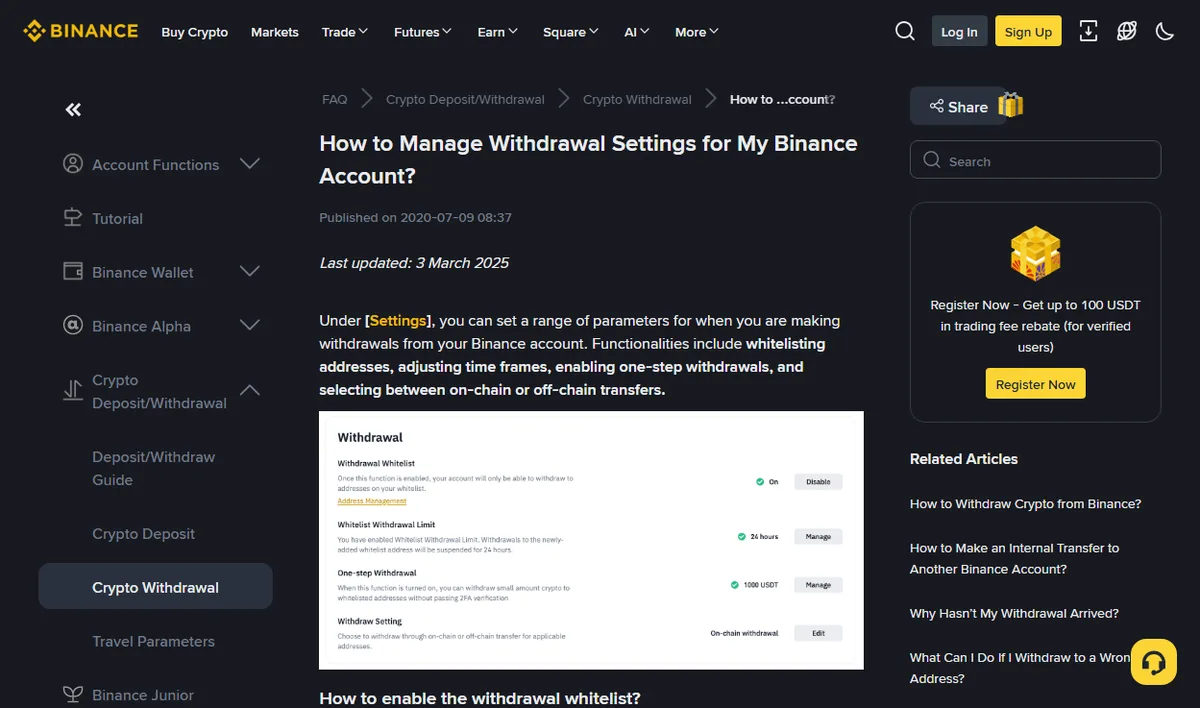
Take the rules from the platform rather than from me. Binance’s page on managing withdrawal settings states that once the whitelist is on, the account can only withdraw to addresses on the list, and that modifying or disabling the list temporarily suspends withdrawals for 24, 48 or 72 hours (checked 2026-08). Those two sentences are the whole value of the feature, and its only cost.
With this on, funds can only leave to addresses you added in advance. Adding a new one requires verification and usually a cooling-off period before it can be used.
Its value: even someone holding your password and codes cannot send coins to an address of their own: they would have to add it to the whitelist first, and that triggers verification and a delay, which is enough time for you to notice. It is the only one of the four that still helps after you have already been compromised.
The cost is real too: you also wait when adding addresses. So:
- Add your regular addresses when you are not in a hurry, rather than on the day you need to move money;
- Name them with the chain included — "Binance USDT TRC20", not "Address 1". That habit incidentally protects against choosing the wrong network, which is a more common error;
- Clear out addresses you no longer use; a shorter list is a harder list to misclick.
Four: clear the old platform's API keys
The one that gets forgotten, because it is not in front of you.
If you ever connected copy trading, a bot, a price tool or a portfolio tracker, those API keys are still sitting on the platform you are leaving. However far a platform winds down, the API is generally the last thing switched off. A key with trading permission left on an account you no longer watch is a quiet but real exposure.
Go to the API management page on the old platform and delete everything you are not using. While you are there, two more things:
-
Check which third-party apps have authorisation
Some platforms keep a separate "authorised applications" list. That is another door; clear it too.
-
Unlink payment methods
Bank cards and third-party payment accounts on a platform you no longer use have no upside.
Same principle at the new platform: on a fresh account, if you do not need an API key, do not create one. Create it when you need it, with permissions cut to the minimum: read-only where read-only suffices, and never withdrawal permission under any circumstances.

If the new home is Binance, our referral code applies a fee reduction at sign-up. It is shown here to copy; you enter it yourself.
BN6321This site carries Binance referral links. Using the code does not cost you more (per the current pages); up to 20% off trading fees, with the actual figure whatever the exchange page shows.
Beyond the four: a few habits
Settings are one-off; habits are continuous. None of these require you to do anything, only to not do things.
Always enter from a bookmark, never from search
Save the address as a bookmark and use only that. The top results on a search page can be ads, and buying an ad slot is routine practice for clone sites. This one habit prevents more scams than the four settings above combined.
Never reuse the password
The exchange password must not match any mailbox or social account you own. When someone pulls your usual password out of a leaked database, the first thing they do is try it everywhere.
The mailbox needs two-factor too
The mailbox is the password-reset route, which makes it the master key to everything else. Its security should be higher than any individual exchange account's, and for most people it is the other way round.
Nobody helps you in a direct message
Official support does not message you first, does not ask for verification codes, does not want your private key or recovery phrase, and never asks you to move funds to a "safe address". These sentences have been repeated for years and people still get caught, because the message arrives at the exact moment you are anxious — right after posting for help, right after noticing a stuck withdrawal.
One variant worth flagging: someone posing as another victim gets in touch to say they found a team who recovered their funds. That is act two of the same scam, aimed specifically at people who have already lost something once. The only routes that exist are the platform's official channels and, where relevant, law enforcement where you live.
If something does go wrong: the first ten minutes
You notice an unfamiliar device in the login list, or a withdrawal confirmation you did not request, or a balance that dropped. Order matters here, and getting it wrong wastes the minutes that count.
-
Freeze first, investigate after
Most platforms have a "disable account" or emergency freeze option in security settings, sometimes surfaced through the help centre. Press it. Stopping the bleeding comes first; understanding what happened can wait.
-
End every session
Security settings has "log out of all sessions". Changing the password does not necessarily kick out sessions that are already active, so this is a separate action.
-
Change the password, replace two-factor
Password first, then rebind the authenticator. If they already changed the binding you are into account recovery, which is where the material you saved earlier earns its keep.
-
Check API keys and the whitelist
The first thing an intruder often does is not withdraw but quietly create an API key with withdrawal rights, or add an address to the whitelist, so their route survives your password change. Both lists need going through line by line.
-
Then open a ticket
Write the timeline, the symptoms and what you have already done, with screenshots. Specificity here directly determines how fast it moves.
One more, easily missed: check whether your mailbox has acquired a forwarding rule or a filter. This is a standard way of covering tracks: platform notifications get auto-archived or deleted so the alerts never reach you. It is well hidden and takes a minute to check.
Risks that are not yours, but reach you anyway
One last category you cannot control and can reduce the impact of: data breaches.
The email and password you used to register on some unrelated site can end up in the open because that site was compromised. The first thing an attacker does with the pair is try it against every major exchange. Which is why "never reuse the password", tired as it sounds, is the single most effective item on this page.
Three things you can do:
- Use a dedicated mailbox for exchanges, not the one you register everywhere with. Then a leak elsewhere does not tell an attacker where to aim;
- Let a manager generate every password, one per site. You do not need to remember them, only the master;
- Check periodically whether your address appears in known breaches. Several public services do this; where it turns up, change the corresponding password.
None of them are hard. What is hard is that the payoff is invisible: do them and nothing happens, and nothing happening is the entire objective.
If you only do one
Do the authenticator, and write down the recovery key. It blocks the most common and most terminal case: a leaked password leading directly to a taken-over account.
If you can do two, add the anti-phishing code — five minutes, and an entire family of email scams stops working.
The other two are worth doing but are closer to insurance: the whitelist matters once you are already in trouble, and clearing API keys deals with a landmine you may never step on. Work down the order and stopping anywhere still beats not starting.
Where these sit in the wider migration sequence is in the migration handbook. In short: set the protections up before the money arrives, because the other way round leaves a gap.
Risk notice: this describes general practice for account security; feature names and availability differ between platforms, so whatever your own settings page offers is what applies. Crypto prices move violently and you can lose everything you put in, and no amount of account hardening removes the platform's own business risk. Nothing here is investment advice.