Accounts and fees
Opening a Binance account, step by step
A migration has to land somewhere specific. This walks the Binance account-opening flow end to end, with the weight on the three things that actually cause trouble: where the referral code goes, why verification gets rejected, and what to lock down the same day.
Three seconds before you touch anything: check the domain. Search results are not a guarantee of anything, and a convincing clone of a sign-up page takes an afternoon to build. The real addresses are binance.com and its account subdomain accounts.binance.com. Anything else, treat as fake: the six digits from your authenticator are very easy to give away and impossible to take back.
The conclusion first. The whole flow is four segments: enter an email or phone number, set a password, clear a verification code, pass identity checks. The first three usually take under five minutes. The fourth is the one that stalls people, and it stalls for a short list of reasons. The referral code is not a separate step: it either rides in on the link you arrive through, or sits behind a field you have to expand.
This walks the whole thing in the order it actually happens, and covers the two questions that come up afterwards: why verification gets rejected, and what to lock down the same day. If you landed here because the platform holding your coins is in trouble, read the migration handbook first and come back — doing it the other way round means doubling back.
Three things to settle before you start
None of these are hard. All three belong to the category of "discovered too late, invalidating everything before it".
One: whether your region is served normally
Exchanges operate at different depths in different jurisdictions. Some regions get everything, some get a subset, some get nothing at all. There is no fixed list worth publishing here: the list changes, and it changes faster than any third-party article updates. The reliable move is to open the exchange's own terms of service and read what it says today, or open the sign-up page on your actual home connection and see whether you get redirected somewhere else.
A quicker tell, if you want one: look at whether local payment methods are still listed. Fiat rails and local bank channels are the first things to disappear when a platform winds down its presence somewhere, usually well before any announcement. If the peer-to-peer page in your country suddenly offers two options where it used to offer six, that is a real signal, not bad luck with the page load.
Two: an email address you will still control in five years
This mailbox will carry password resets, withdrawal confirmations and unusual-login alerts. Using a work address is a common and bad choice: leave the job and you lose the lot. Use something you own, with its own password and its own second factor.
Three: an ID document that photographs cleanly
Verification will want pictures of your document. Scuffed lamination, a bent corner, or glare across the number all cause the automated read to fail. Find somewhere with even light — not directly under a lamp, which reflects, and lay the document flat on a dark surface. Getting this right first time saves an entire round trip.
Email or phone: which to register with
On the sign-up page these go in the same box, so either works. What differs is everything afterwards.
Registering with email
- Unaffected when you change number or move country
- The mailbox itself can carry a second factor, so you get another lock for free
- Codes occasionally arrive slowly, and sometimes land in spam
Registering with a phone number
- SMS codes arrive fast; day-to-day logins feel smoother
- Changing number or carrier means re-running the security checks to rebind
- If someone gets your SIM reissued, the exposure lands directly on the account
What I do is register with email and attach the phone number only as a backup factor. The reasoning is mundane: over the past few years I have changed phone numbers far more often than email addresses, and every rebind means another round of verification, not obviously less work than opening the account again.
The page also offers "Continue with Google", "Continue with Apple" and "Continue with Telegram". I do not use any of the three. Not because they are insecure, but because each one chains your exchange account to another platform's account: that one gets compromised, this one is exposed; that one gets suspended, your way in disappears. Typing one more password buys an independent path, which I think is a good trade.
What the sign-up page actually looks like
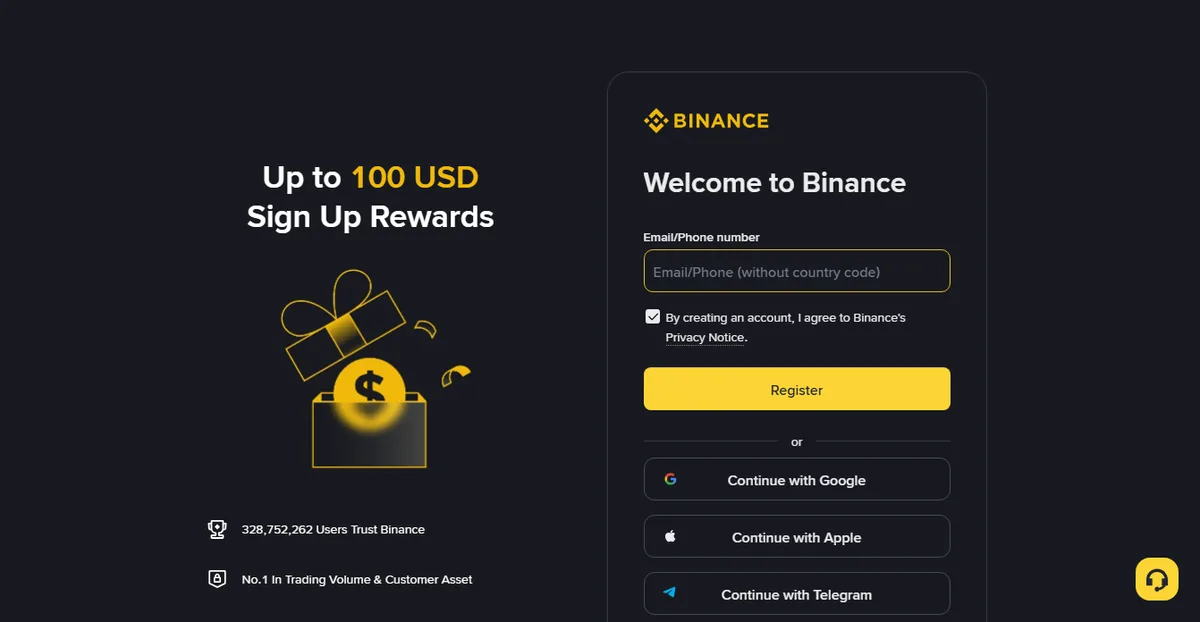
Here is the page in a browser. The entire form is one field and one yellow Register button, with three third-party options underneath and a line of small print reading "By creating an account, I agree to Binance's Privacy Notice".
Where the referral code goes
This is the most asked question here, and the answer splits two ways:
- You arrived through a link carrying a code. The code is already in the address: that
ref=segment on the end is it, and the form will usually not show you a separate box. Nothing else is needed from you. - You opened the site directly. Somewhere in the sign-up flow there is an expandable "Referral code" or "Referral ID" option. Open it and type the code in. The exact position moves between interface versions, but it is always there; you have not missed it.
One timing point matters: a referral code only applies at the moment the account is created. It cannot be added afterwards. If you already have an account, skip this section entirely — closing it and starting over to capture a fee discount does not add up under any arithmetic.

Our referral code BN6321
Go to the Binance sign-up page
That is a referral link and we may earn a commission from it. Signing up with our code gets you up to 20% off trading fees*; * the actual figure is whatever the exchange page shows and it can change. HUIVORA is run by an independent team and is not affiliated with Binance.
Do not coast through the password step
The strength requirement is usually the familiar "at least eight characters, one uppercase, one number". Meeting it is not the same as being safe: an enormous share of compliant passwords are some variant of Abcd1234. Two things actually work: let a password manager generate something you could not memorise if you tried, or string four unrelated words together and drop a couple of symbols in. Either way, this password must not appear on any mailbox or social account you own.
If you use a manager, keep an offline copy of the master password too. This is a structural single point of failure: every password lives in the manager, the master lives only in your head, and then a phone gets replaced or a machine gets reinstalled and nobody on earth can let you back in. Writing it on paper in a drawer sounds primitive, but it defends against forgetting, not against attackers: two different problems that deserve two different answers.
Identity verification, and why it fails
Being able to log in is not the same as being able to use the account. Deposits, trading and withdrawals generally require identity verification first. This is the only part of the process capable of costing you days.
-
Basic details
The name must match the document exactly, including punctuation and any unusual spellings. Where your legal name differs from what you normally write, the document wins.
-
Document upload
Passport, national ID or driving licence are generally all accepted; which ones depend on the country you select. Fill the frame with the document but do not crop the corners, and keep the flash off.
-
Liveness check
Turn your head, blink, follow the prompts. This step is unusually sensitive to light — backlighting, glare off glasses and hats all cause failures. A plain wall, facing a window rather than with your back to it, has the best hit rate.
-
Waiting
When it goes smoothly it is a matter of minutes. When a human has to look, it takes longer. Resubmitting repeatedly does not help and can push your case back down the queue.
The four common rejection reasons
| What you see | Usually because | What to do |
|---|---|---|
| Rejected almost immediately | Blurred, glared or cropped document photo | Reshoot: dark surface, side light, no flash |
| Name mismatch | What you typed differs from the document | Retype character by character from the document |
| Liveness check keeps failing | Light, obstruction, or movements too small | Remove glasses and hat, face the light, slow down |
| Stuck on "under review" | Escalated to a human, or documents are missing | Check messages and email for a request; do not resubmit |
There is one more category that does not fit neatly: proof of address. Not everyone is asked for it, but when it comes up it is the hardest step in the whole flow, because most people simply do not have a document that is under three months old, shows their name and address, and was issued by a third party. Bank statements, utility bills and formal tenancy agreements usually qualify; anything you printed yourself or filled in by hand does not. If you reach this point, read the list of accepted document types before uploading anything rather than trying your luck with a screenshot.
One warning about verification documents: however urgent it feels, never send ID photos or liveness videos to anyone offering to "fast-track" your approval. The offer is common on social platforms. The price is your identity documents in someone else's hands, and the service does not exist: review happens inside the platform and there is no outside entrance.
What the account can do once verified
Verification is not pass-or-fail so much as tiered: different levels carry different limits and unlock different features. Higher levels want more documents and give more room.
| Roughly the level | Typically requires | Roughly unlocks |
|---|---|---|
| Registered, unverified | Email or phone | Little beyond looking at prices; deposits, trading and withdrawals mostly restricted |
| Basic verification | Name, document, liveness check | Everyday deposits, trading and withdrawals within the platform's current limits |
| Advanced verification | Plus proof of address or source of funds | Higher ceilings, and some fiat routes |
Level names and specific limits differ between platforms and change with policy. Whatever your own account page shows is the number that applies.
For a migration, basic verification is usually enough. Unless the amount you are moving exceeds the basic withdrawal ceiling, or you need a fiat route to convert into local currency, there is no reason to hand over the advanced documents up front. One fewer document submitted is one fewer place it can leak from.
One counter-intuitive detail worth knowing: limits generally roll over a twenty-four-hour window rather than resetting at midnight. Withdrawing at eleven at night does not mean a full allowance the next morning. People moving larger amounts often read this as an account problem when it is just the window not having rolled yet.
Getting funds in: three routes and what each costs
Account open, next question is how the money arrives. Three common routes, with quite different costs and speeds.
| Route | Roughly how fast | Watch for |
|---|---|---|
| On-chain transfer from the old exchange | Minutes to tens of minutes, depending on chain | Both ends must support the network; there is a withdrawal fee; address and memo must be right |
| Peer-to-peer with another user | Usually minutes to half an hour | Deal only with merchants inside the platform; check the receiving account is in your own name |
| Bank card or third-party payment | Depends on the rail, sometimes hours | Availability depends heavily on your region; channel fees are separate |
If you are here because the old platform is in trouble, the first route is the default: the coins are already on-chain, so sending them straight across is the least work. The part that deserves thought is which chain, and I wrote that up separately: which chain to withdraw on.
The peer-to-peer route needs one extra sentence. Inside the platform it is a managed feature: matching, release of funds and dispute handling all happen there, and the risk is contained. What goes wrong is always the step where someone leaves the platform to settle privately — once you are outside the escrow you have neither evidence nor an appeal route. Anyone asking you to pay outside the platform, whatever the stated reason, ends the conversation.
An easily missed detail: money received through peer-to-peer trading can arrive carrying someone else's problem. If the bank payment sent to you is itself tied to a case, your account can get caught up in it. The way to reduce that exposure is to deal only with high-volume, fully verified merchants and to keep every chat log and receipt. What to keep and for how long is in which transfer records are worth keeping.
What to do the same day the account opens
A freshly created account is at its weakest: you are collecting codes and changing bindings everywhere, which is precisely when phishing works. The following take under twenty minutes in total.
-
Turn on two-factor authentication
Use an authenticator app rather than SMS. Write the recovery key down on paper, if the phone is lost or the system reinstalled, that string is the only thing that moves the authenticator to a new device. SMS ranks lower because it cannot defend against a SIM being reissued: whoever holds your number holds every SMS-based entrance you have.
-
Set an anti-phishing code
This is a string you choose, which then appears in every genuine email the exchange sends you. An email arriving without it goes straight in the bin, no matter how convincing the layout. Five minutes of work that eliminates an entire family of scams: the fake "unusual login detected, click here to freeze your account" message can copy the styling perfectly, but it cannot forge a string only you and the platform know. Do not use a birthday or your username: a couple of unrelated words and some digits is ideal.
-
Enable the withdrawal address whitelist
Once on, coins can only leave to addresses you added in advance. The cost is a cooling-off period when adding new ones. The benefit is that even someone logged into your account cannot send funds to an address of their own.
-
Look at the device list
Account settings show currently logged-in devices and recent sign-ins. Build the habit of glancing at it now, while nothing is wrong, and you will notice the extra entry later if there ever is one.
These four are covered in more operational detail, including how to clear out long-forgotten API keys on the platform you are leaving, in four settings to fix the day you move platforms.
Before the first real money arrives
Having an account does not mean moving everything today. The sane sequence is to send a small amount first and prove the whole path:
- Withdraw an amount from the old platform that clears the minimum with a little room, over a network both ends support;
- Confirm it arrived, and that the coin and the quantity both match;
- Then decide how the larger amount travels.
Treat that first fee as insurance. Wrong address and wrong network are almost always first-attempt errors, and almost always irreversible. Six places withdrawals actually go wrong covers each one; it is worth a glance before you click.
One sequencing note: set up the whitelist and two-factor before the money arrives, not after. Done the other way round you leave a gap where the funds are present but the protections are not — exactly when you have just typed the new credentials into several devices.
Whether to split a large amount across several transfers is a judgement call. Splitting caps the damage if the first one goes wrong; it also pays the withdrawal fee more than once, which matters when on-chain costs are high. I decide by amount: under what I could stand to lose, one transfer; over that, two or three with a confirmation between each.
Do not treat "account open" as the finish line
Opening the account is quick. What actually decides whether this migration goes smoothly is what comes after: right chain, whitelist set, records kept. Agonising for half a day over the sign-up flow and then pasting the wrong address into the withdrawal page in thirty seconds is a wildly lopsided allocation of care. The half day saves nothing. The thirty seconds is where the money is.
Setting expectations on fees
Spot maker and taker fees sit in the 0.1% band for ordinary users; ticking the BNB discount reduces that, with the exact discount and tier table on the current fee page (checked 2026-08). The referral reduction and the BNB discount are independent of each other and do not conflict. How the three combine, and why withdrawal fees are an entirely separate matter, is in how Binance fees work.
Compressing the whole thing into a checklist
If you only want an order to follow, it is these nine:
- Confirm the domain is the real one, not the convincing result above it;
- Have a mailbox you control long-term, with its own second factor;
- Enter the sign-up page through a link carrying the code, or expand "Referral code" and type it in;
- Set a password used nowhere else and store it in a manager;
- Clear the email or SMS code; the account exists;
- Complete verification: name typed from the document, photos reshot under side light;
- Same day, set two-factor, an anti-phishing code and the withdrawal whitelist;
- Send one small transfer from the old platform that clears the minimum, and confirm the path works;
- Only then move the rest, keeping the hash and reference for every transfer.
Step eight is the one people skip and the one most worth its fee. Everything before it exists so that step nine is uneventful.
Can I register without a referral code?
Yes. A code is not required to open an account. You simply do not get the associated fee reduction.
I already have an account — can I add a code now?
No. A referral code applies only at the moment the account is created, and there is no route to add one afterwards. Closing an account and reopening it for the code is rarely worth it.
Does using a referral code make my fees higher?
No. Signing up with a code does not cost you more than signing up without one; it changes the discount applied. The exact figure is whatever the exchange shows on its current pages.
Verification keeps failing. Is there another way through?
There is no way around it, and nobody offering to fast-track approval can actually do so. What works is reading the specific rejection reason, reshooting the document under better light, retyping your name from the document, or supplying whatever was requested.
Should I use a VPN while registering?
Not to change which region you appear to be in. A registration location that conflicts with your verification documents tends to trigger review later, and sorting that out is considerably more work than being straightforward at the start.
Our referral code
Sign up with our code for up to 20% off trading fees*
* The actual figure is whatever the exchange page shows and it can change. HUIVORA is run by an independent team and is not affiliated with Binance.