Notices and delistings
Sent a delisted token to Binance after deposits closed? Recovery, fees and timing
Binance won't credit a token deposited after deposits closed, but its recovery page has a row for old and delisted tokens: the coins are refunded on-chain, minus a network withdrawal fee.
The block explorer says the transfer went through. The receiving address is your Binance deposit address. And yet the balance hasn't moved. Then you reread the delisting notice and spot it: deposits stopped being credited some time before you hit send.
The coins aren't gone, but they won't show up by themselves either. Binance's help article How to Retrieve a Deposit That Hasn't Arrived With Self-Service Recovery? has a fee table with a row of its own for "Old/delisted tokens": the outcome column says "Refund", the fee is the network withdrawal fee, and the estimate is 5 working days. So the best case is that the coins are sent back out on-chain to an address you choose. They are not added to your Binance balance, and the page is clear that recovery isn't guaranteed.
Which kind of missing deposit is this?
The recovery page splits missing deposits into several cases, and the outcome and cost differ a lot between them. To place yours you need two things: the notice for that token, and the time your transfer landed on-chain.
| When your coins arrived | Row on the recovery page | Fee | Estimate | Outcome |
|---|---|---|---|---|
| After the delisting notice's deposit cut-off | Old/delisted tokens | Network withdrawal fee | 5 working days | Refund |
| Token still trading; deposit confirmed over an hour ago, still not credited | Deposit not credited | Free | 5 working days | Credit |
| Deposit history shows "Wrong Deposit" with a [Retrieve now] button | Smart retrieval | 1 USDT | 7 working days | Refund |
| A token Binance never listed, on a network it does support | Unlisted tokens on supported networks | 20 USDT | 30 working days | Refund |
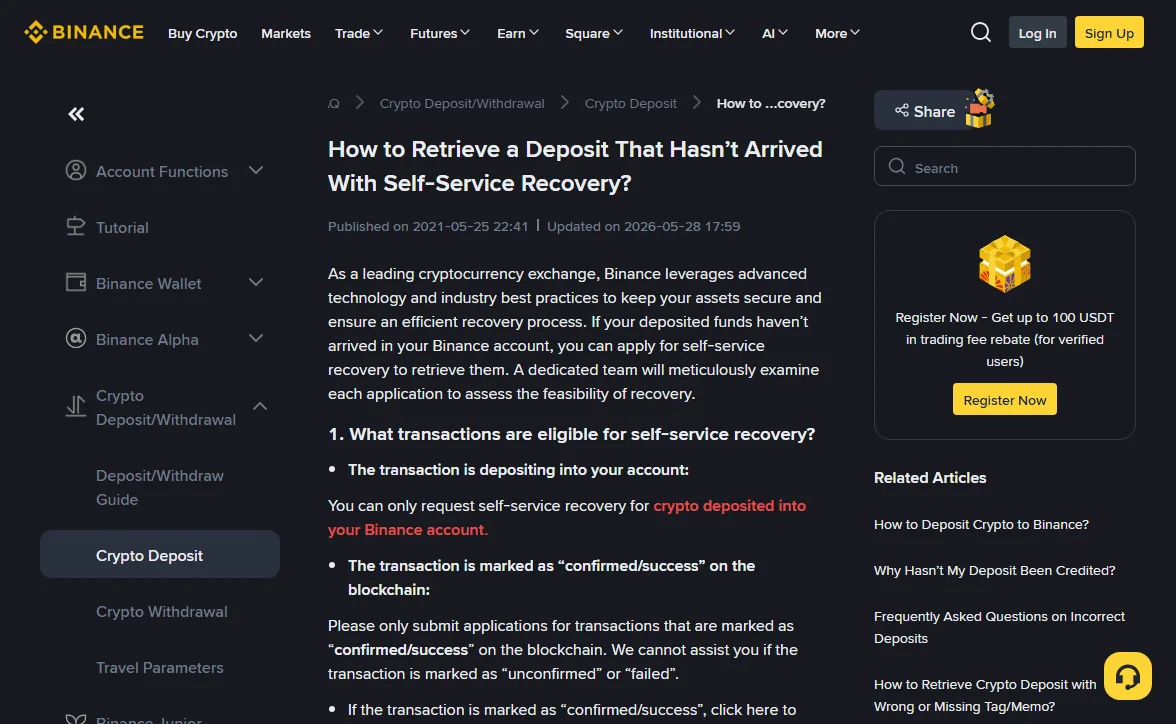
The fees and timings come from the page as it read in October 2026 (it showed an update date of 2026-05-28), and the page itself warns that fees can change. For a late deposit on a delisted token, the first row is the one that matters. The others are listed because a post-delisting deposit is easy to mistake for an ordinary delay, and the difference is that waiting won't fix it.
What the "Old/delisted tokens" row means in practice
You get a refund, not a credit. If recovery succeeds, the coins are sent back on-chain to a return address you provide. Before you file, line up an address that can still receive this token on the same network. After a delisting, plenty of venues drop the token too, so a self-custody wallet is often the safer target. If you'd rather use another exchange, check its deposit page first to confirm it still takes this token on this network. The trade-offs between the two are in Your own wallet, or another exchange?
The fee is the network withdrawal fee, charged only on success. The amount appears under [Application Records]. On a small deposit that fee can be a large share of what comes back, and the page says nothing about what happens if very little is left after it. Do that sum before you file.
The 5 working days don't start when you click submit. According to the page, the clock starts once Binance has received the required information and the fee. Any time spent waiting for you to send more material doesn't count.
What to copy from the block explorer before you file
Almost every field on the form can be read straight off the transaction page. Copying from the on-chain record beats filling it in from memory: near the top of the page's list of common rejection reasons are a TxID or address that doesn't match and an amount that's off.
-
Status: confirmed or successful
Only transactions marked "confirmed/success" on the blockchain are accepted. Unconfirmed or failed ones aren't. The deposit should also be more than an hour old and still uncredited. If it's still confirming, wait.
-
The TxID, pasted rather than typed
It's a long hexadecimal string, and one wrong character means the transaction can't be found. Copy it from the explorer or from the sending side's withdrawal history.
-
Receiving address and network, as shown on-chain
The page asks for the "to" address shown on the blockchain. Use the address the transaction actually went to, even if your Binance deposit address has changed since. Same with the network: use the chain the transaction is actually on, not the one you think you picked.
-
Full ticker and a clean amount
Give the complete ticker; the page's example is "sUSD", not "USD". The amount can have up to 8 decimal places and no thousands separators.
If the coins came from another platform, the page notes you may be asked for that platform's record of the transfer, including the TxID. While you can still log in there, screenshot or export that withdrawal. Which fields are worth keeping is covered in Which transfer records are worth keeping.
The buttons you'll click, in order
Log in to Binance, open the deposit recovery form, paste the TxID and click [Submit]. If Binance's system already knows the transaction, the coin, network, deposit address and amount fill in by themselves. If not, enter them from what you copied above, check them, then click [Confirm].
From then on, progress shows under [Application Records]. Binance may ask for more material while reviewing; the page's example is a verification video. When the recovery succeeds and it's time to pay, you'll confirm the return address and any Tag/Memo it needs. A mistake there repeats the original mistake, so slow down at that step.
Sent after a network lost support: no row of its own
A close cousin of delisting is when the token keeps trading but Binance stops supporting one of its networks. The October 2024 notice ending support on selected networks is typical of the wording:
After 2024-10-23 08:00 (UTC), any deposits sent via the following networks will not be credited and may lead to asset loss.
How to tell this kind of notice apart from a real delisting is in Binance suspended withdrawals on a coin: maintenance or delisting?
The recovery page's fee table has no row for this case. What you can do is submit the TxID the same way and see whether the system recognises it. If the form won't take it, or nothing fits, contact support with the TxID. A separate article, Why Hasn't My Deposit Been Credited? (updated 2025-12-19), is blunter about unlisted tokens and unsupported networks: the assets "might be lost and cannot be recovered." The two pages don't say quite the same thing. Our reading is to try the page that lets you file, but don't count on getting the coins back.
While you wait, don't do these two things
- Don't send another one "to test". Sending the same token to the same address again only gives you a second transfer to recover and a second fee.
- Ignore anyone who messages you offering to recover it. The official route is the help-centre form and support, and nobody from there will reach out first and ask for money up front. How that scam usually plays out is in Six places withdrawals actually go wrong.
Haven't sent yet? Check the status page first
The prevention advice in Why Hasn't My Deposit Been Credited? is simple: before depositing, check the Deposit & Withdrawal Status page to confirm Binance still supports the token and the network. If it isn't listed, it isn't supported. A delisting notice also says from what moment deposits stop being credited; what each of its dates controls is explained in Binance delisting notice dates: what each one shuts off.
If your problem runs the other way, with the coins still on Binance and the withdrawal deadline already passed, a different set of rules applies: see Missed the withdrawal deadline on a delisted token?
Risk note: An on-chain transfer can't be reversed once it's broadcast. Recovery depends on Binance's review, and its page says success isn't guaranteed. The fees and timings above were read from the help centre in October 2026, so check that page again before you file. Crypto prices are volatile and you can lose all of your capital.
Do I pay the fee if the recovery fails?
No. Binance's recovery page says the fee is only collected if the retrieval succeeds, and the amount shows up under [Application Records].
Will the coins go back to the address I sent them from?
The page doesn't promise that. You confirm the return address, and any Tag/Memo, at the point where the recovery has succeeded and you pay the fee. If the coins originally came out of another exchange, the sending address belongs to that exchange, so don't use it; copy a fresh deposit address from wherever you want the coins to land.
It's been more than 5 working days. Is something wrong?
Not necessarily. The 5 working days only start once Binance has the information and the fee it needs. Check [Application Records] for a request for more material, such as a verification video, and if there's nothing there, contact support with the application record and the TxID.